
CRM for call centres
A call centre where agents talk instead of dialling
Calls from a browser tab, a dialler that feeds the next contact by itself, and a score for every conversation. No softphone on every machine, and no second system for statistics.
- 0
- softphones — agents call straight from the browser
- 0–100
- AI score on every call instead of spot checks
- from $79
- per month for a team of three users
A new agent is on the line in a minute — nothing to install or fix remotely.
The system calls by itself and connects whoever has just become free.
AI gives a 0-to-100 score, and the manager reviews only what deserves attention.
Separate campaigns and brands live in one system without seeing each other's data.
The agent workstation
A browser tab and a headset is the whole setup
Nothing to install or fix on each machine. A new agent is on the line in a minute, and a remote team works from anywhere with a connection.
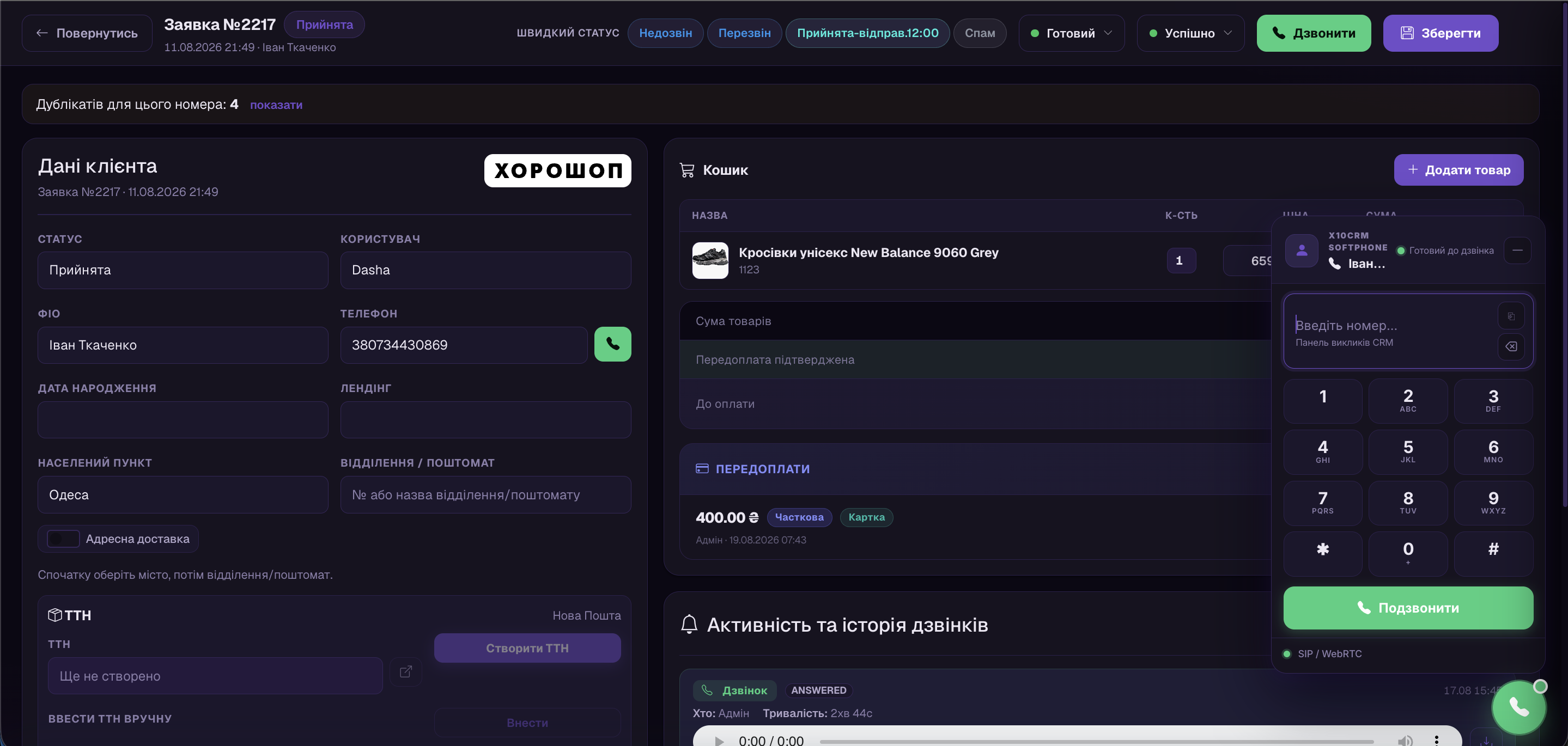
- Call, hold, transfer and conference right inside the CRM
- An inbound call opens the customer's lead with the full history
- Your own numbers from any telecom provider — no porting to us
Power dialler
The system dials and connects whoever is free
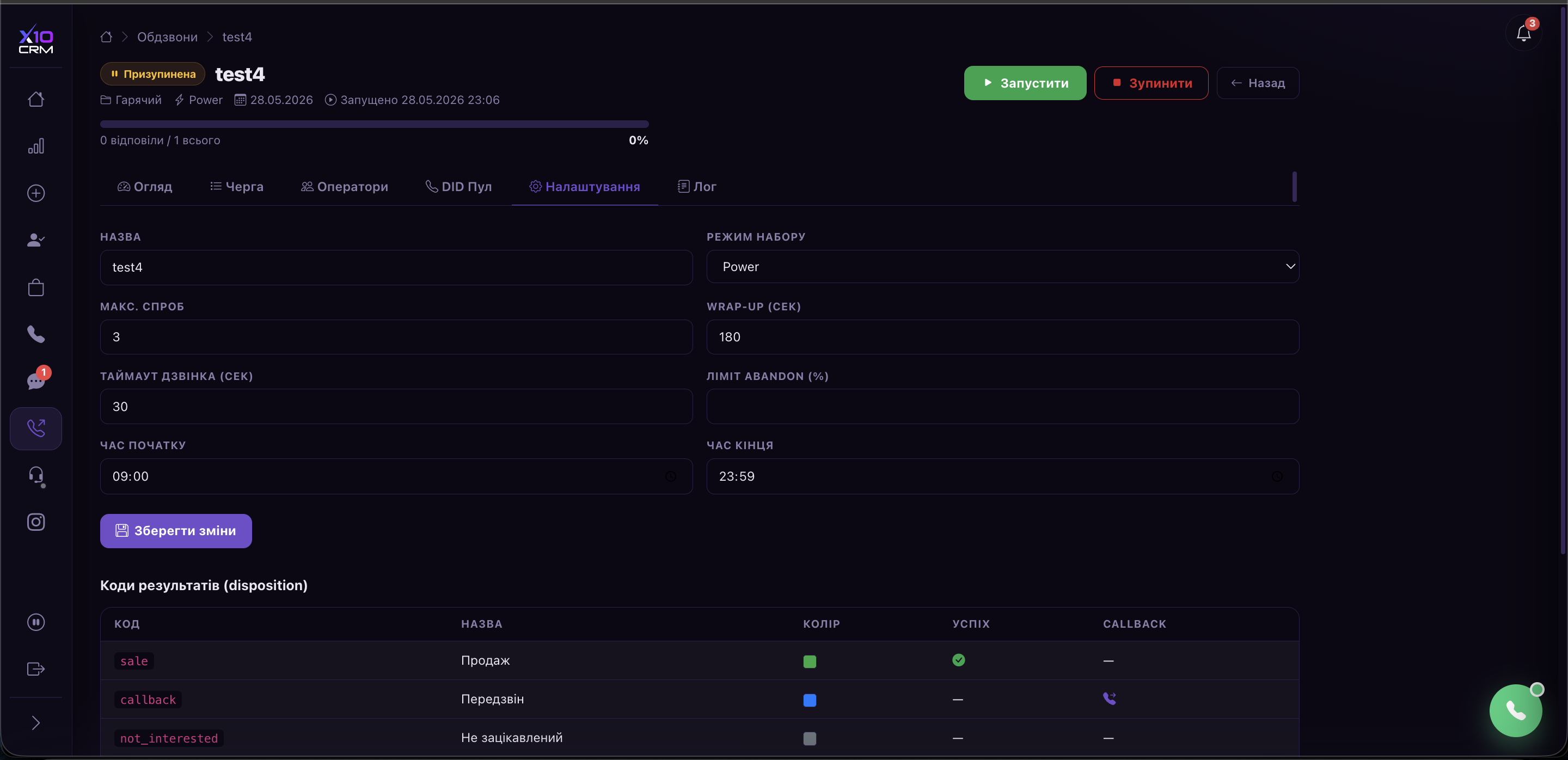
A campaign is built from a filtered selection of leads: who to call, in which hours, how many attempts and how far apart. The agent only ever sees a live connection and the customer card with the script on screen.
- The queue builds itself and never calls the same contact twice
- Card, previous touches and script are open before the first word
- Wrap-up after the call: the outcome is logged before the next contact arrives
AI quality control
Every conversation scored, not a sample of them
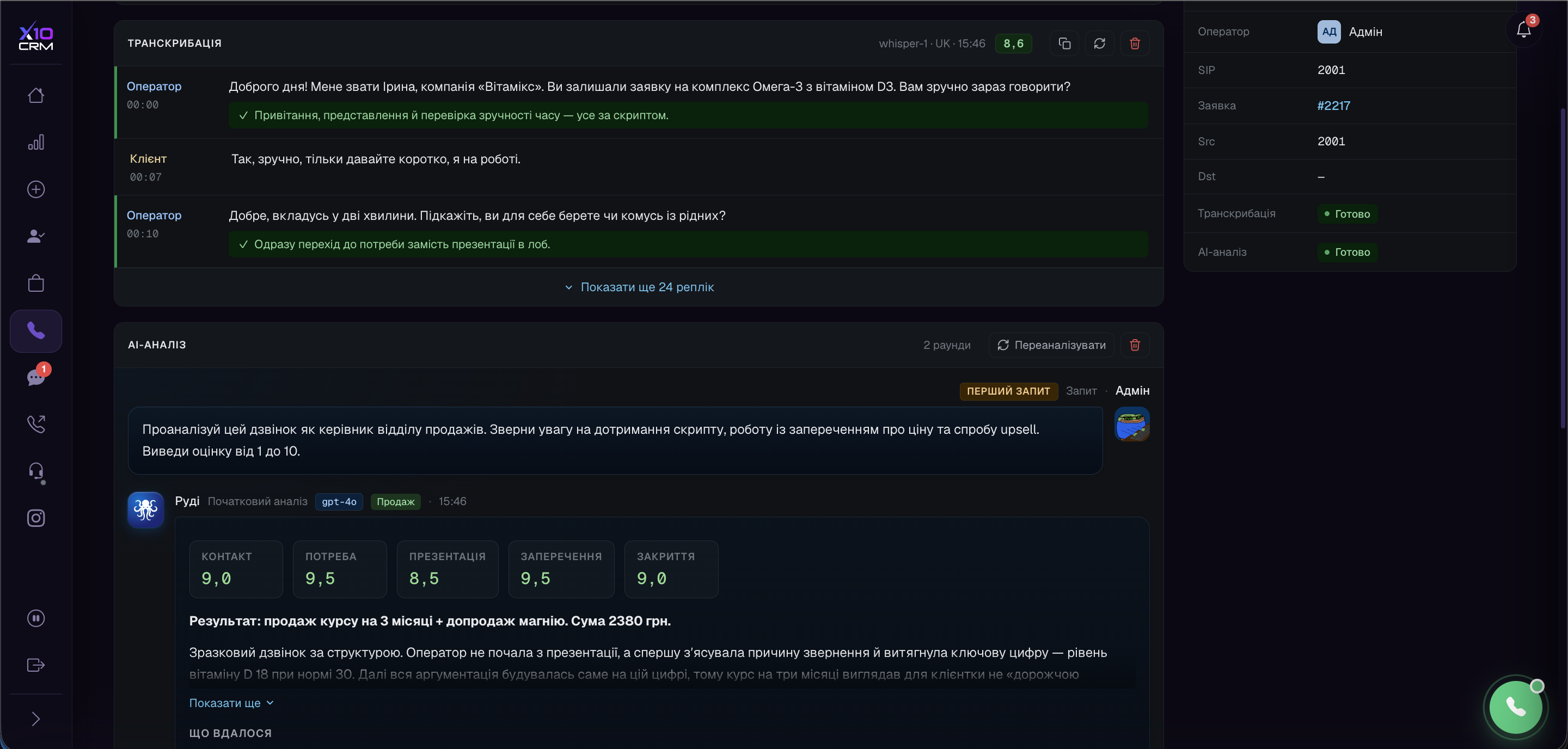
Twenty agents generate more conversations in a day than a manager can listen to in a week. AI transcribes each one and scores it from 0 to 100 against your own criteria.
- Script adherence, objection handling, tone and the attempt to close
- Full-text search across calls instead of scrubbing through recordings
- The manager opens a ready list of the ten calls worth reviewing
Let's count the minutes manual dialling costs you
Give us your numbers — agents, calls per day and average talk time — and we will show what the dialler changes.
Inbound and queues
No call falls into the void
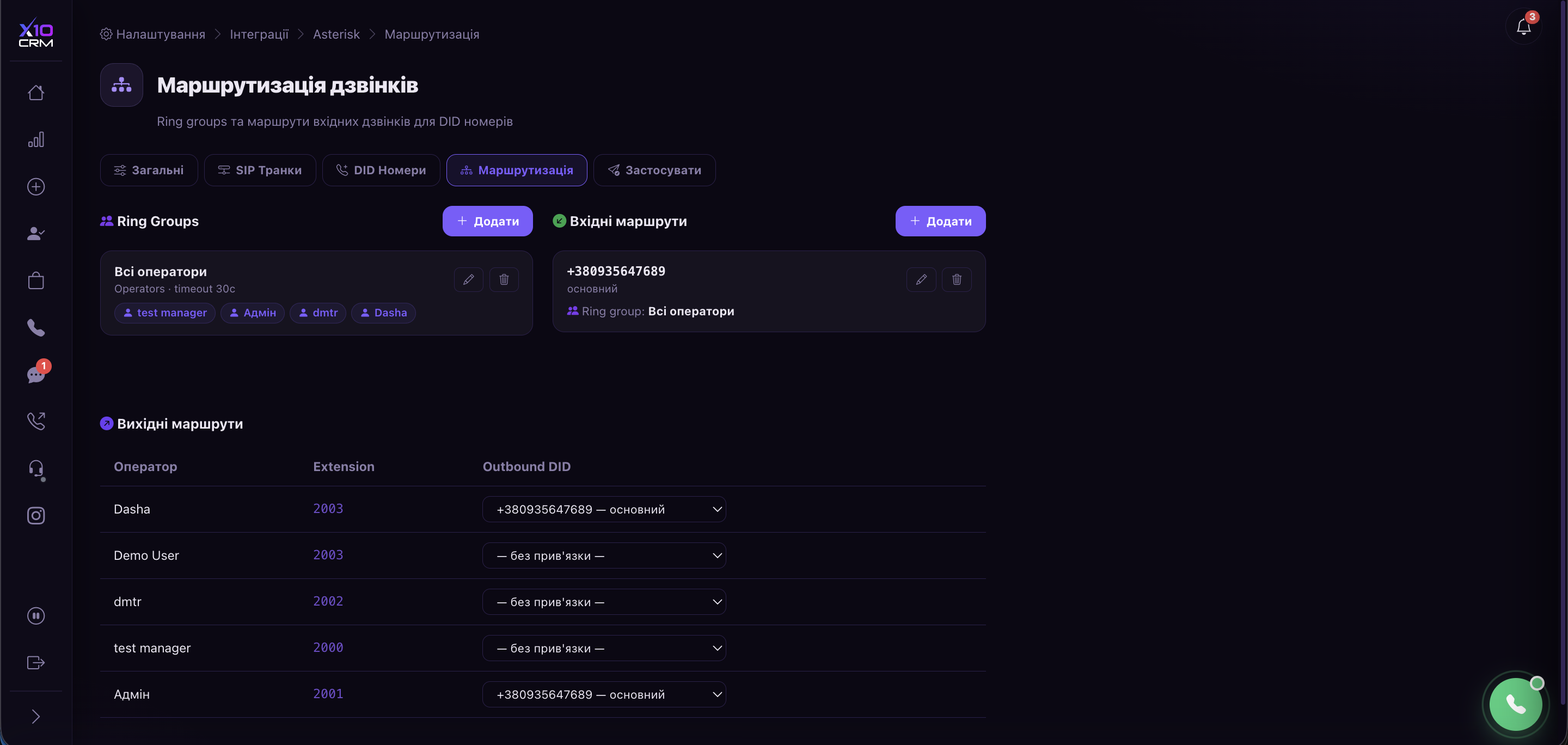
A caller who cannot get through calls a competitor instead. Busy lines put them in a queue, out-of-hours has its own scenario, and every missed call creates a call-back task.
- Queueing and routing across reception groups instead of a busy tone
- A separate number, schedule and group per project or brand
- Missed calls show up in the statistics, not only in someone's memory
Team visibility
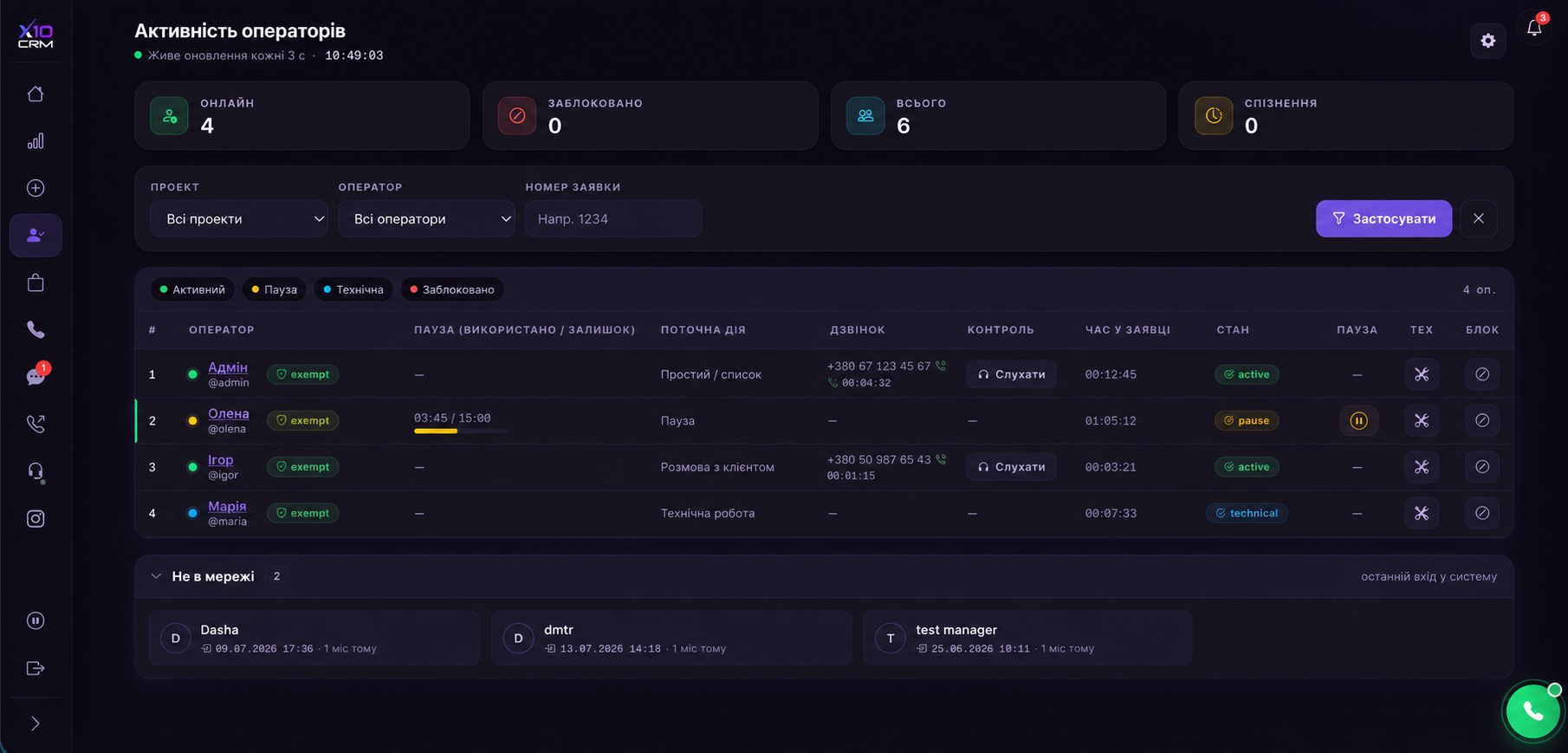
You can see who is on the line, who is on a break and who delivers
Agent states, break types, late starts and live calls in real time. On top of that sits plan-versus-fact per agent, so a conversation about results rests on numbers rather than impressions.
- Break limits configured separately for each project
- Talk time, call count and conversion to sale per agent
- Roles decide who sees which data and which statuses at all
We will show the system on your own process
The demo takes about thirty minutes: we open a test account and walk through the dialler and quality control on an example of your own campaign.
- No slides — the agent workstation and the manager dashboard straight away
- We set up a test project with your statuses
- We work out the plan that fits your team size
How a call centre works in X10 CRM, in detail
What hurts in a call centre
| A familiar situation | What X10 CRM does |
|---|---|
| Agents spend half a shift dialling numbers by hand | The dialler feeds the contact — agents work with their voice, not their mouse |
| Listening to every call is physically impossible, so quality control is a sample | Every conversation is transcribed and scored; the manager gets the problem list |
| A new hire takes three days to go live: softphone, settings, access | The workstation is a browser tab and a headset, live in a minute |
| No one can tell who is actually working and who is on an endless break | Real-time agent states, break types and per-agent limits |
| A missed call disappears and the customer goes to a competitor | The caller joins a queue, and a missed call creates a call-back task |
| Two teams in one base see each other's leads and statistics | Projects isolate data, statistics and even the outbound number |
A call centre is limited not by how many agents it has but by how much of the shift each of them actually spends talking. Manual dialling, switching between a softphone and the customer card, searching the base — all of it eats the day invisibly. X10 CRM removes those minutes rather than adding another tool to the pile.
#The dialler: agents talk instead of dialling
A campaign is built from a filtered set of leads. The system then dials by itself, connects a free agent and opens the customer card with the script already on screen — they can talk from the first second.
- 01
You set the selection and the schedule
Which leads to call, during which hours, how many attempts and with what pause between them.
- 02
The queue builds itself
The dialler decides who is next and never calls the same contact twice.
- 03
The agent gets connected
Card and script are already up, with the history of previous touches beside them.
- 04
A disposition and wrap-up close the call
The agent records the outcome and finishes their note before the queue offers the next contact.
How a campaign is built, which dialling modes exist and what to do with outcome codes is covered step by step: the auto-dialer: outbound campaigns.
#Inbound calls, queues and routing
| Situation | What the system does |
|---|---|
| A first-time caller | The call reaches a ring group and a lead is created automatically |
| An existing customer calls | Their lead opens with the full history |
| Every agent is busy | The caller joins a queue instead of hearing an engaged tone |
| A call outside working hours | The out-of-hours scenario runs and the enquiry is not lost |
| A missed call | A call-back task is created and counted in the statistics |
With several lines of business, each project can have its own number, its own ring group and its own schedule. Teams never hear each other's calls or see each other's leads. How that is assembled — trunk, extensions, groups and routes — is in the documentation: telephony setup.
#Quality control without listening by hand
A twenty-seat centre produces more conversations in a day than a manager can listen to in a week. Quality control is therefore almost always a sample: a few calls are heard and conclusions are drawn about everyone.
AI analysis removes that limit. Every conversation is transcribed and scored from 0 to 100 against your criteria: script adherence, objection handling, tone, whether a next step was agreed. The manager opens a ready list of the ten calls actually worth reviewing.
- Every conversation recorded — nothing to switch on by hand.
- Live call monitoring for a supervisor when a new hire is handling a difficult customer.
- The script on screen during the call — new hires skip fewer stages.
- Full-text search across conversations instead of scrubbing recordings.
Where recordings live, how long they are kept and who can reach them — call recordings; how a conversation becomes text — call transcription.
#Discipline and team workload
Online states, break types, late starts and live calls are visible in real time. Break limits are configurable per project — cold campaigns and customer support do not run to the same norms.
On top of that sits plan versus actual: duration, call volume and conversion per agent. That is what turns a conversation about results from impressions into figures — and what makes standing over people unnecessary. Who sees what, and which statuses each person may set, is configured through roles: roles and permissions, statuses and the pipeline.
#Which plan fits a call centre
The minimum for a call centre is Team: telephony, recording, supervisor monitoring and call analytics. Business + AI adds the power dialler, outbound number rotation and AI scoring — the threshold where manual quality control stops working, roughly from five to seven agents.
Prices are in the pricing section. The numbers are yours, from any telecoms provider: telephony does not tie you to a supplier and does not resell traffic.
Frequently asked questions
- Do agents need to install a softphone?
- No. Calls run straight from the browser — an agent needs the CRM tab and a headset. For a distributed team that is the difference between being live in a minute and half a day with a sysadmin.
- Can we connect our existing numbers?
- Yes. The system does not tie you to a specific telecoms provider. If you already have numbers, in the vast majority of cases they are connected directly with nothing to migrate.
- How many agents does the system support?
- There is no seat limit — each customer runs on their own server, so capacity is sized to your load. Plans are counted per user, with each additional one from $20.
- What does the power dialler do?
- It dials contacts from a filtered set, connects them to a free agent, respects the schedule and retry count, allows wrap-up time and records the outcome of every attempt.
- How do we control quality with hundreds of calls a day?
- Every conversation is transcribed and scored from 0 to 100 against your criteria. The manager reviews not every call but the handful the AI flagged as problematic.
- Can several teams work in one system?
- Yes. Projects fully isolate leads, statistics and settings — an agent on one line of business cannot see another's data, even inside the same CRM.
- Do call recordings leave our server?
- They do not have to. The AI can be deployed inside your own perimeter, and then audio never physically leaves your hardware.
Ready to try it with your team?
Leave a contact and we will get in touch during working hours to agree on a time.