
CRM for online stores
CRM for an online store: all the work in one window
X10 CRM collects orders from marketplaces and your own site, and brings stock, delivery, calls and reports along with them. Your team stops jumping between seller cabinets and spreadsheets, and you can see at any moment where each order stands and what the store has earned.
- 1
- window instead of a dozen tabs and spreadsheets
- 0
- sales of items that are no longer in stock
- from $79
- per month for three users
Rozetka, Prom, Horoshop and your own site — operators never switch between cabinets.
Written off on dispatch, returned on refusal, and pushed back to every connected platform.
Nova Poshta, Ukrposhta or Meest — created where the customer data already lives.
Telephony is built in, and AI checks how the operator handled the buyer.
Orders
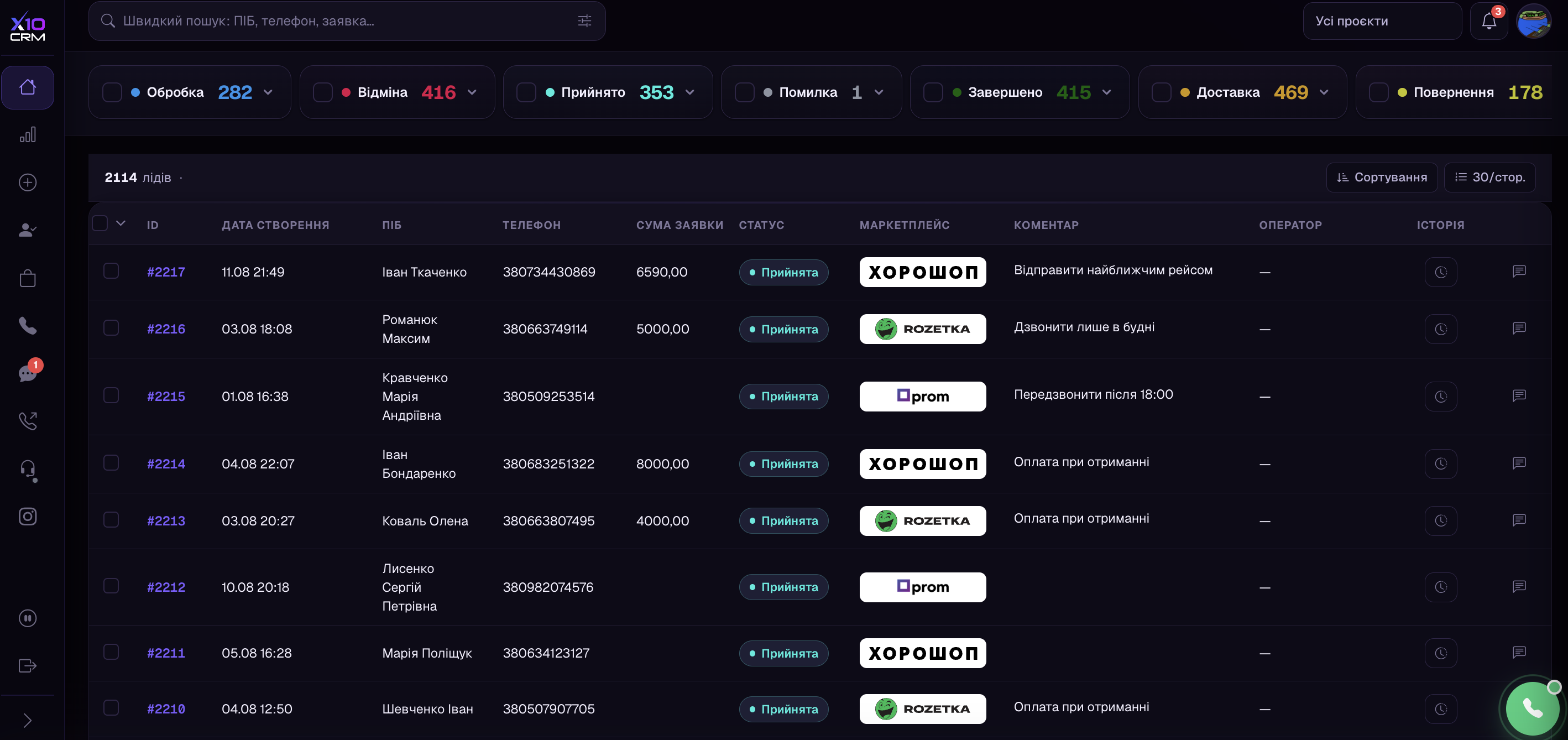
Orders from marketplaces and your own site in one list
No need to keep a cabinet open for every platform. An order lands in the CRM by itself the moment it is placed — with the buyer, the items, the total and the delivery method. Your team sees everything in one list and gets straight to work.
- Each order shows where it came from, so you can see which channel pays off
- Your own site connects through the API — its leads appear instantly
- We ship new integrations all the time, so the list of platforms keeps growing
Stock
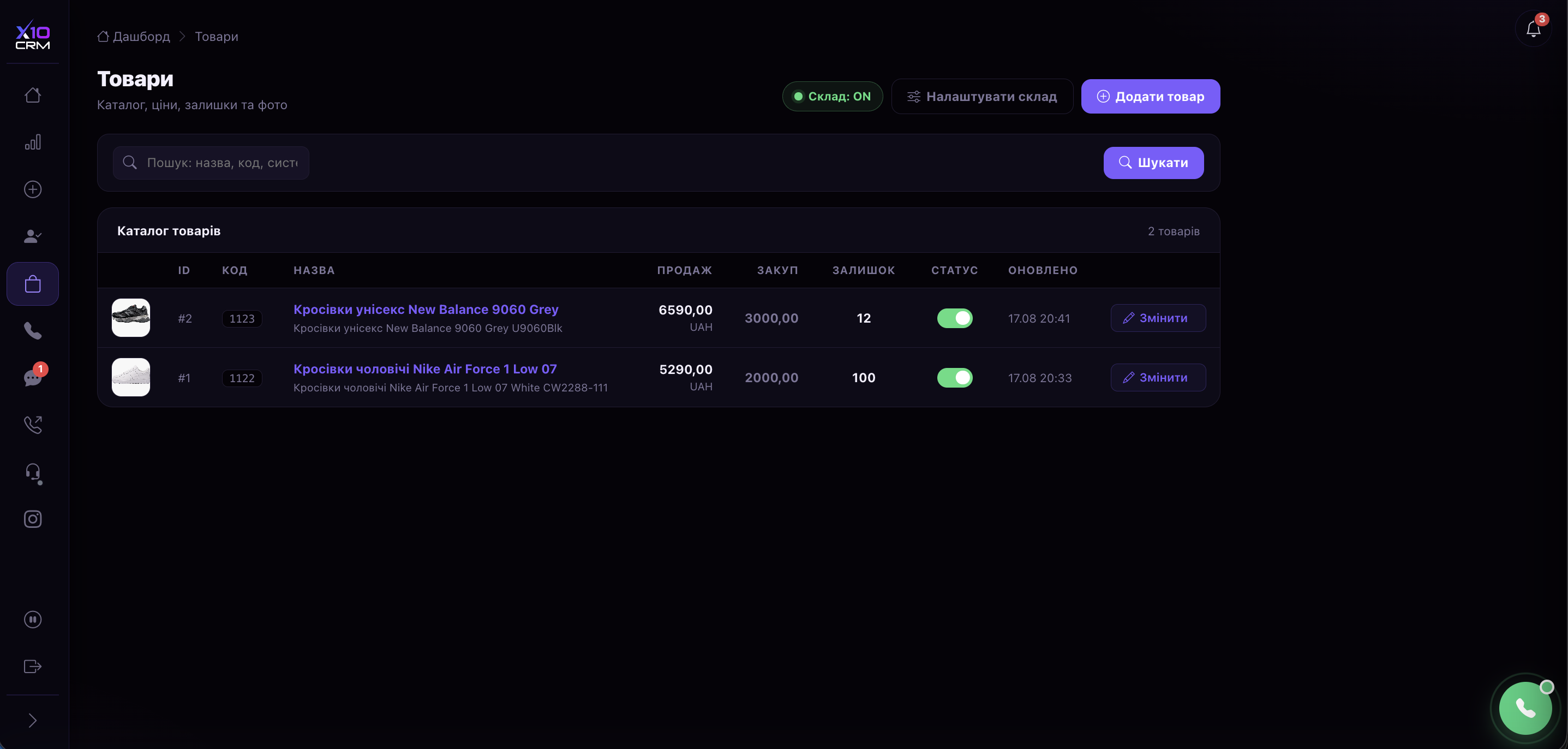
One stock for every sales channel
The most expensive mistake a store can make is selling something it no longer has. Here an item is written off when the parcel leaves and comes back into stock if the customer refuses. Current quantities go out to every connected platform on their own.
- An item is reserved as soon as it is added to an order
- A return puts the item back in stock — nothing to recount by hand
- Fewer apologies to customers and fewer cancelled orders
Delivery
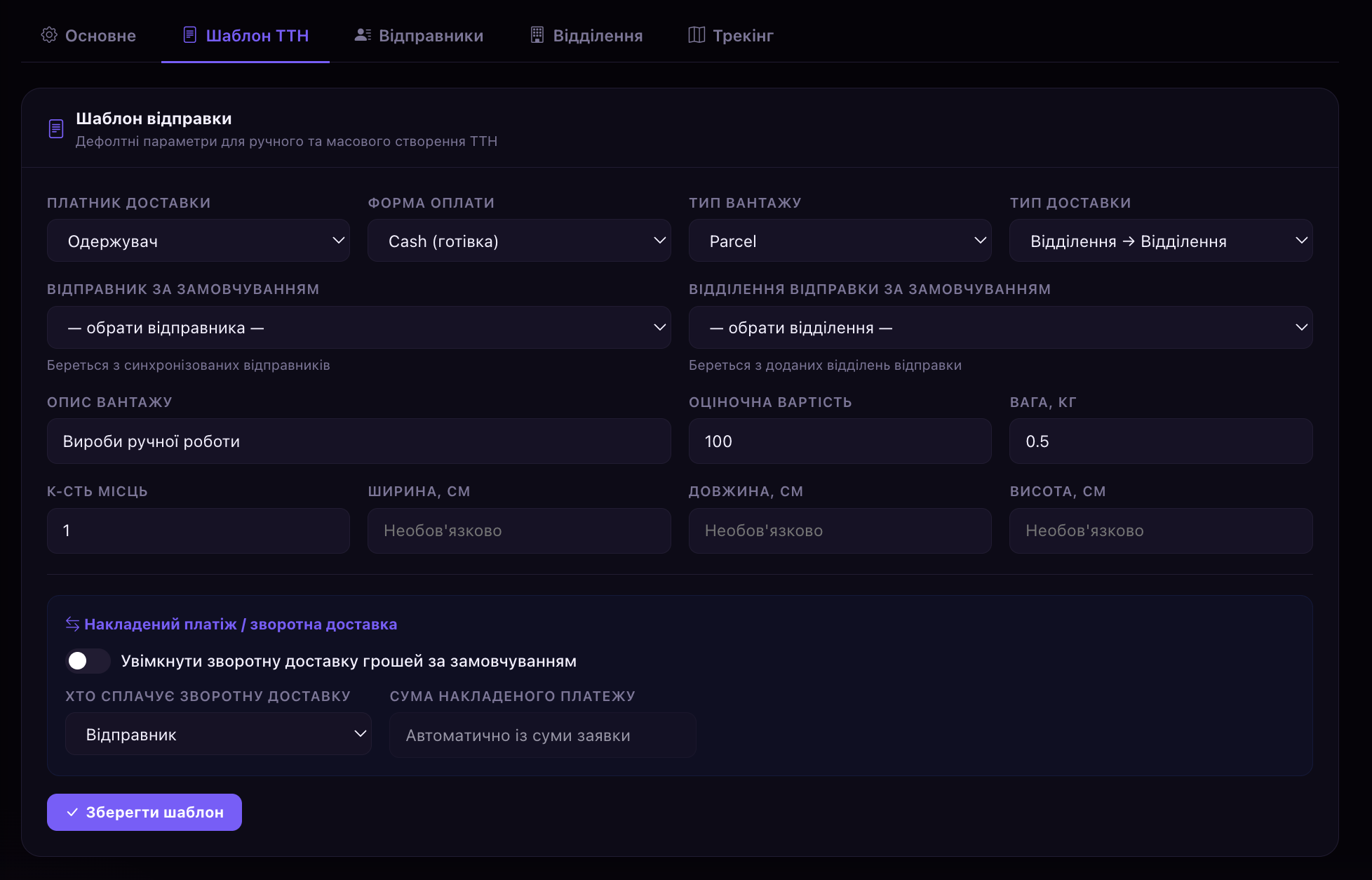
Waybills created straight from the order
The address, the branch and the cash-on-delivery amount are already in the order, so nothing has to be retyped. The waybill takes a couple of clicks, and after that the CRM tracks the parcel and shows what is happening with it.
- A hundred waybills can be created in one go, for the whole list
- When a parcel is collected or returned, the order changes status by itself
- You see the real payout rate, not what the operators say it is
Let's work out what your store is losing today
Tell us where you sell and how many orders you get a day, and we will show what changes once everything runs in one system. It is free and commits you to nothing.
Calls
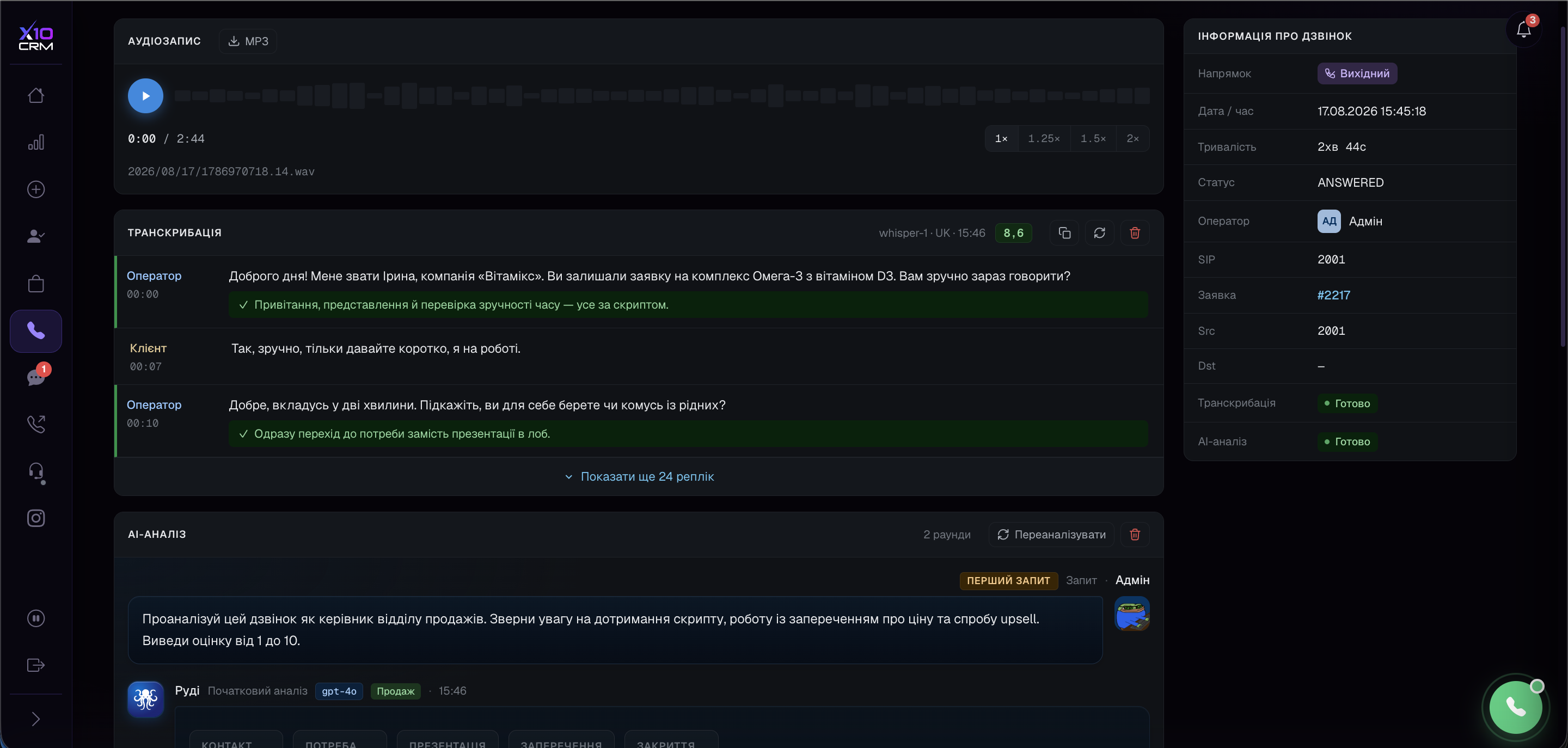
Call customers from the CRM, with every call recorded
Your team calls from the browser without leaving the order — no separate calling app to install. Every conversation is recorded, and AI listens to it for you and points out where the customer was lost.
- Confirm an order by phone and you get fewer returns
- No need to listen to hundreds of recordings to know how your team talks to customers
- You can see why this particular month brought more refusals
Order flow
Order handling without the extra manual work
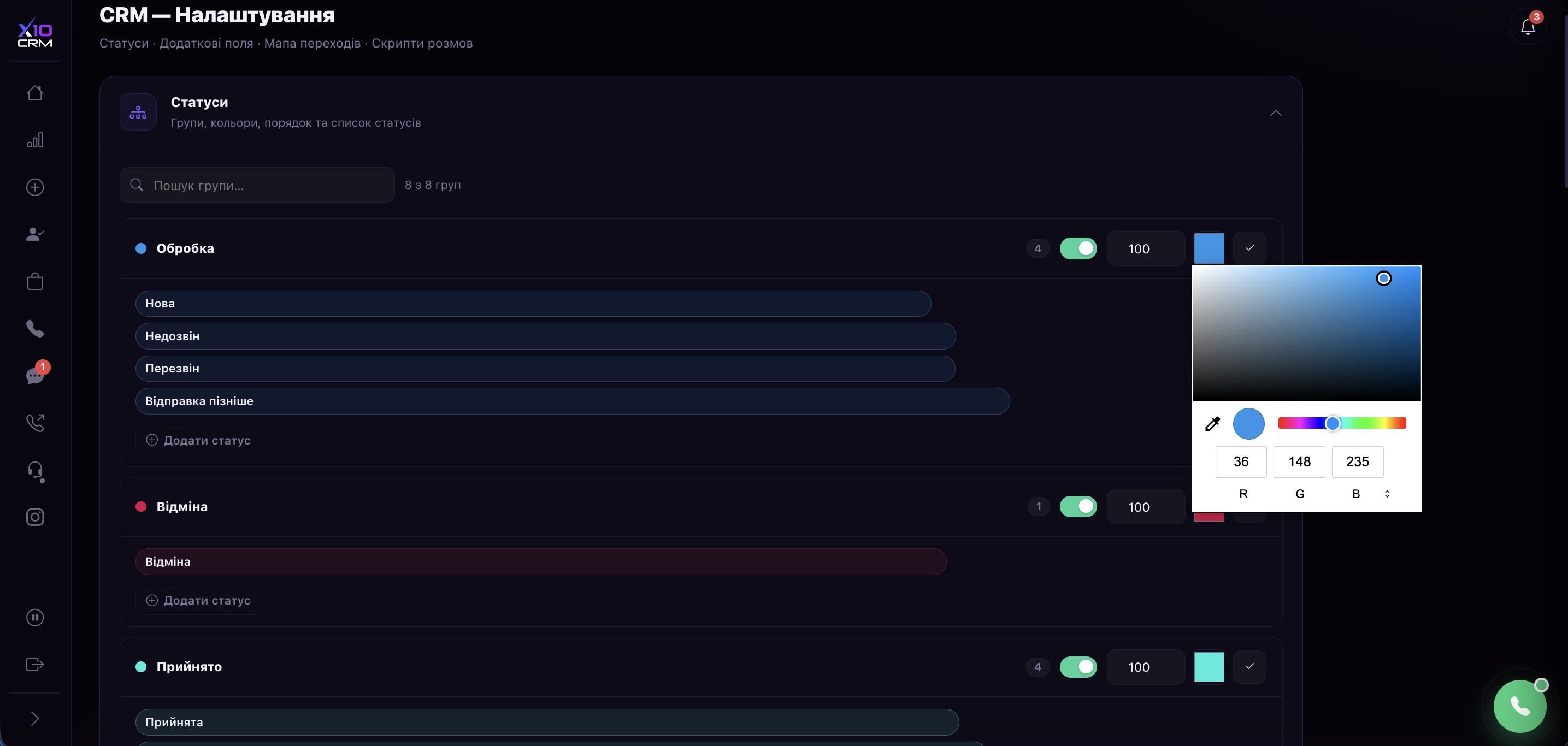
Statuses and stages are set up around your store, not the other way round. Whatever is done the same way for a hundred orders is done once for the whole list. And the customer's history — orders, calls, messages — sits in one place.
- Your own statuses instead of someone else's template
- Change a status, assign an operator or print waybills for everything selected at once
- We move your old base over from Excel — nothing to retype
Reports
Reports that show what the store actually earned
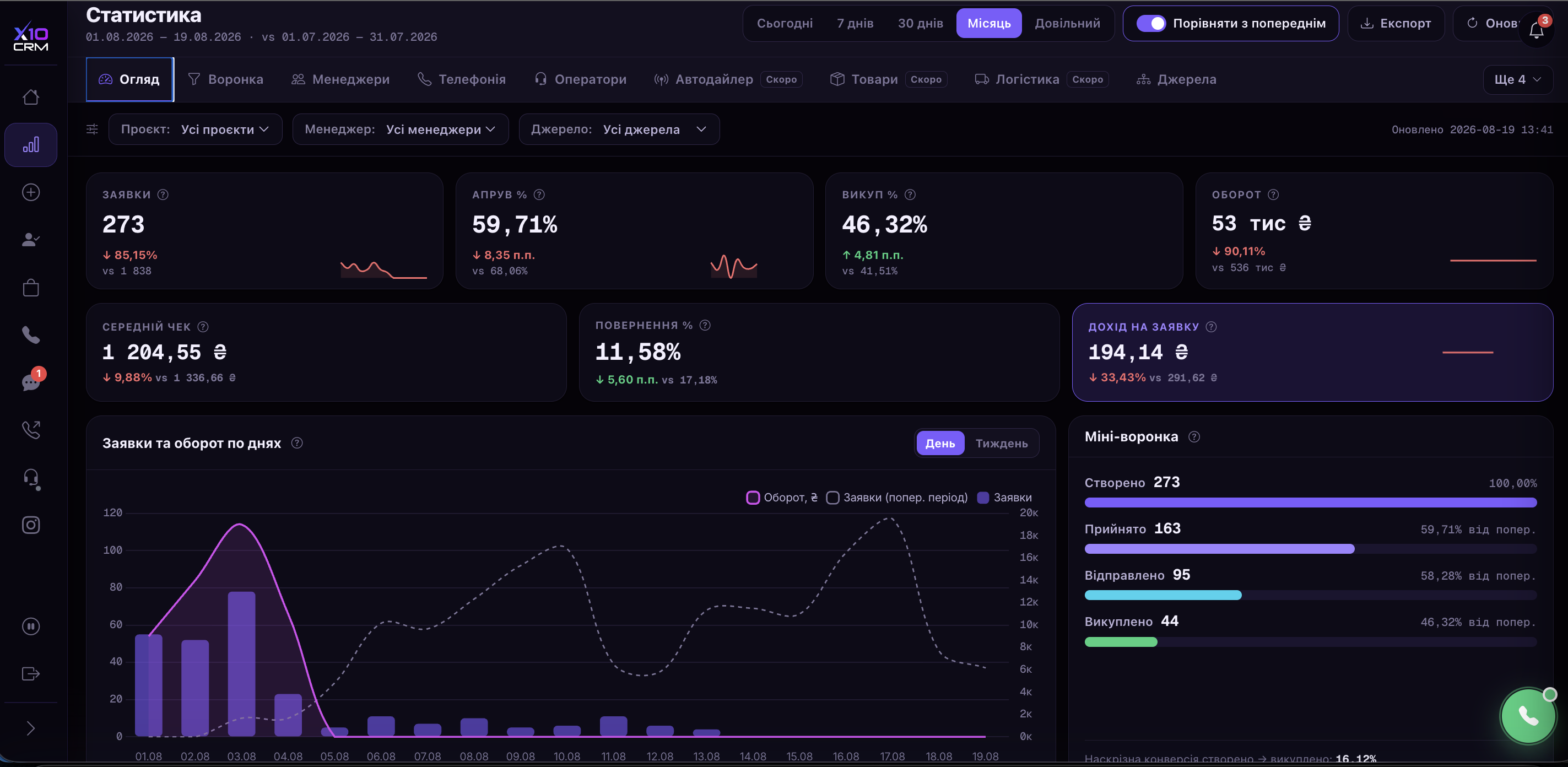
No more stitching numbers together from cabinets and spreadsheets — it all adds up on its own. You can see how many orders are in progress, how many were paid for, which channel brings the money and who on the team really sells.
- Profit and payout rate for every channel and product
- How many calls and orders each person handled
- A manager sees only their own leads; you see the whole store
What usually changes after the switch
Examples of what our customers see. The numbers depend on the catalogue, the number of channels and the size of the team.
no switching between cabinets, no copying data by hand
confirmation calls from the CRM and quality control on them
waybills are created for a whole list instead of one by one
one stock shared by the site and every marketplace
We will show the CRM on your own store
The demo takes about half an hour. We follow an order from the channel to delivery, show the stock and the waybills, and work out the plan that fits your team.
- No slides — we go straight into the system itself
- We set up your statuses and a few real orders
- We tell you what to connect first
More about the CRM for an online store
What hurts in a store selling through several channels
| A familiar situation | What X10 CRM does |
|---|---|
| Orders sit in three cabinets and operators spend the day switching tabs | Every platform merges into one lead dashboard with the source marked |
| An item sold twice because stock on the site and the marketplace drifted apart | Inventory lives in the CRM, and current quantities go out to every connected platform on their own |
| Waybills typed by hand, addresses moved by copy and paste | The waybill is created from the order card with the fields already filled |
| Nobody knows why the payout rate dropped this month | Delivery statuses feed the funnel, and AI shows where the buyer was lost |
| A customer calls and the operator has no idea what they ordered last year | The customer record holds every order, call and message in one timeline |
A store rarely lives on one channel: the site, Rozetka, Prom, sometimes Instagram. Each has its own cabinet, its own statuses and its own idea of what is in stock — and while there are a dozen orders a day, that holds together in an operator's head. Past that point is exactly why people buy a CRM.
#Orders from every channel in one place
X10 CRM pulls orders from connected platforms automatically, as soon as they appear, and turns them into leads with the buyer, items, total and chosen delivery method. Operators see them next to leads from the site and from calls — one list, with the source logo in a column.
- [Rozetka](/en/integrations/rozetka) — orders, statuses and waybills both ways, plus catalogue and stock.
- [Prom.ua](/en/integrations/prom) — the same, plus price push keyed on your own SKU.
- [Horoshop](/en/integrations/horoshop) — store orders, products matched on SKU, bundles priced correctly.
- Your own site — leads arrive through the API, wherever they are sent from.
- OpenCart and WordPress are in progress and land in an upcoming release.
What the lead itself looks like, and why two operators cannot edit it at the same time, is in the documentation: the lead card. An existing order or contact base is moved separately: importing from Excel and CSV.
#Stock that will not let you sell what you do not have
Selling the same unit twice is the most expensive mistake in multi-channel retail: the customer has already paid and there is nothing to ship. In X10 CRM inventory lives in one place and propagates to the platforms by itself.
- 01
The item is reserved when it enters the lead's cart
It is no longer available to another operator while the order is in progress.
- 02
Written off on dispatch
Not when the order is created, but when the parcel actually leaves.
- 03
Returned on refusal or return
The delivery status puts the goods back into stock — nobody recounts by hand.
- 04
Current quantities go out to the platforms
Hourly, keyed on the product identifier in your own accounting system.
Reservation, write-off and prepayments as the operator sees them are covered step by step: the cart, products and prepayments.
#Delivery and the payout rate
The waybill is created from the order card: recipient, city, branch and the cash-on-delivery amount come from the lead fields. From there the system watches the parcel itself — the carrier's status maps onto the lead status, so the funnel reflects the real state of orders.
| Event | What happens in the CRM |
|---|---|
| Order confirmed | Stock reserved, the waybill can be created |
| Parcel dispatched | Stock written off, the buyer gets an SMS with the tracking number |
| Arrived at the branch | The collection reminder fires |
| Collected | The lead moves to paid and the amount enters your statistics |
| Returned | Goods go back into stock, the lead moves to rejected |
All three carriers connect at once: Nova Poshta, Ukrposhta and Meest. The operator picks one inside the lead, depending on the destination and the order value. What exactly you need from the carrier and where it goes is in the step-by-step guide: Nova Poshta: waybills and tracking.
#Calls that lift the payout rate
For a store shipping cash on delivery, the confirmation call is not a formality — it is the difference between a paid order and a return. Telephony is built in: operators call from the browser, conversations are recorded, and AI transcribes and scores every one of them against your criteria.
In practice that answers the question which otherwise stays a guess: why there were more refusals this month. Not "the operators seem to have got worse", but specific conversations flagged at the point where the buyer was lost. The technical side is in the documentation: telephony and browser calls, call recordings, transcription.
#Which plan fits a store
If two or three people handle the orders and calls are not the priority, Start is enough: leads, stock, delivery, marketplaces. If every order is confirmed by phone, you want Team, with telephony and call recording. Business + AI earns its place once there are more than five operators and quality control cannot be done by listening manually.
Prices and what each plan includes are in the pricing section. Marketplace and carrier integrations are included in every plan, the starter one as well.
Frequently asked questions
- Which marketplaces does the CRM work with?
- Rozetka, Prom.ua and Horoshop — orders, statuses, waybills and catalogue in both directions. You can connect several cabinets per provider, for separate stores or legal entities.
- Can I connect my own site rather than only marketplaces?
- Yes. Leads from any site reach the CRM through a token-authenticated API, whatever the store is built on. Ready-made OpenCart and WordPress integrations are in progress.
- How does the CRM stop the same item being sold twice?
- Inventory lives in one place. Items are reserved when added to a cart, written off on dispatch and returned on refusal, and current quantities are pushed to every connected platform automatically.
- Are waybills created from the CRM?
- Yes, from the order card — the customer data is already there. Nova Poshta, Ukrposhta and Meest are supported, and waybills can be created in bulk across a filtered list of leads.
- Do delivery statuses update automatically?
- Yes, several times a day. The carrier status maps onto the lead status, so the payout rate is calculated from real data rather than from operator ticks.
- How much does a CRM for an online store cost?
- From $79 a month for three users. Marketplace and carrier integrations are included in every plan, with nothing charged separately.
- How long does onboarding take?
- We connect the cabinets, migrate the catalogue and customer base, and agree the status mapping around your process. You can try it free for 10 days with no limits.
Still have questions? We will show it on your orders
Leave your number — we will call back during working hours, answer your questions and arrange a demo.