
CRM automation: triggers, webhooks and SMS
How to set up "when this happens — do that" rules: lead events, timers, conditions, a webhook to another system, an SMS to the customer or a CRM notification, and where to check the result.
A trigger is a rule: "when X happens to a lead — do Y". For example: the lead moves to Accepted — send it to the warehouse; three days with no activity — notify the manager; the customer placed an order — send a thank-you SMS. Triggers live in Settings → Automation → Triggers.
#The trigger list
The page lists all triggers with All, Enabled and Disabled tabs, search by name, and the Execution log: the last 100 runs with their results. A trigger can be switched off without deleting it — for the length of a sale, for example.
#Creating a trigger
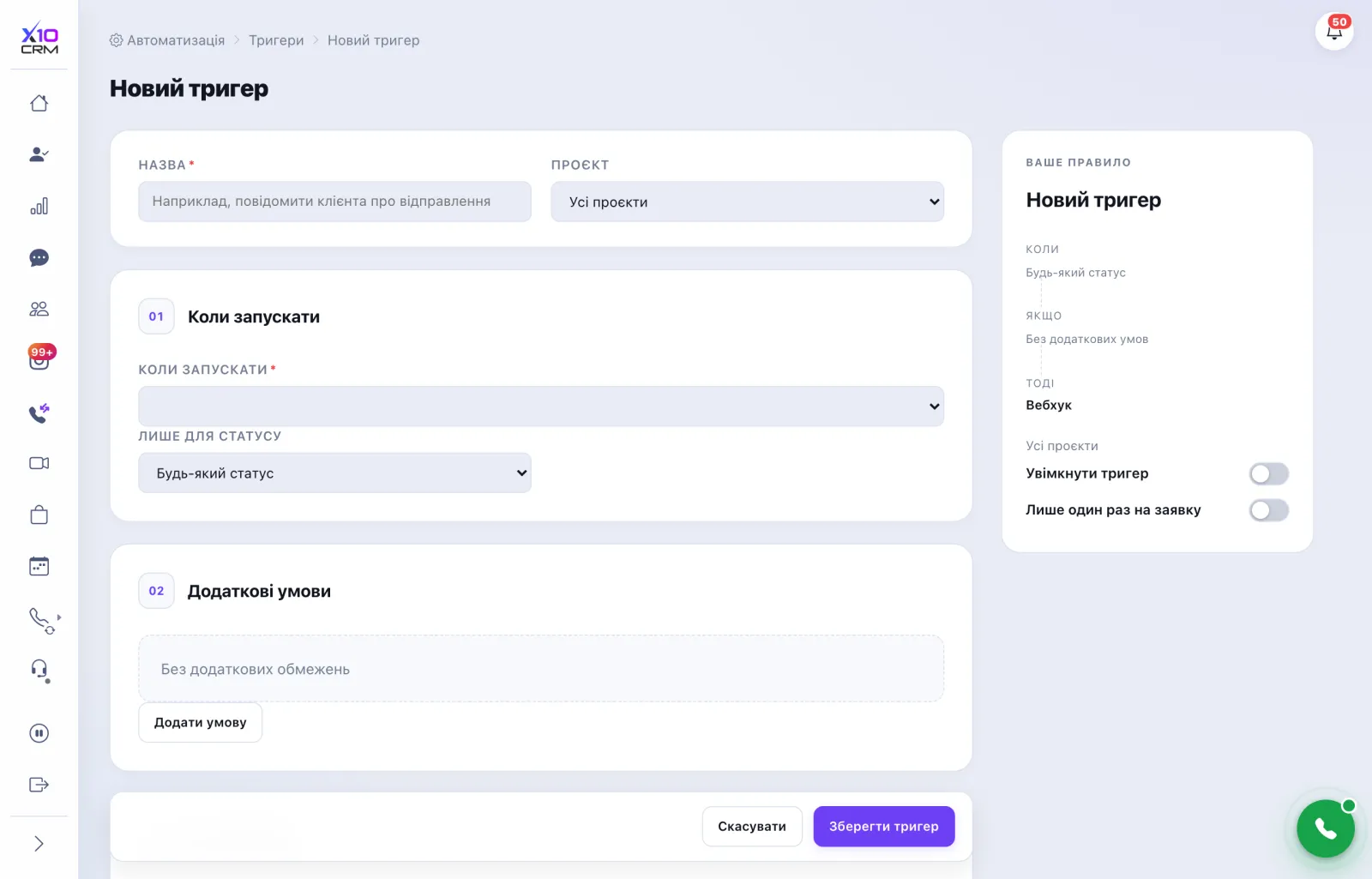
- 01
Name and project
The name is for you, to find the trigger in the list. A project limits the trigger to one business line; All projects applies everywhere.
- 02
When to run
An event or a timer (see the table below) and, if needed, the status it applies to.
- 03
Additional conditions
Narrow it down by lead fields: source, amount, project, a custom field's value. Without conditions the trigger fires for every lead with that event.
- 04
What to do
Webhook, SMS or CRM notification.
#Events and timers
| When to run | Example |
|---|---|
| Lead created | Post every new lead to the manager's Telegram chat or another system |
| Status changed | Accepted → pass the order to the warehouse; Shipped → SMS with the tracking number |
| Manager changed | Notify the new owner |
| Field value changed | The address changed — sync it with your accounting system |
| Days since creation | 30 days after a purchase — an SMS offering a repeat order |
| Days in current status | Two days in Call back — notify the team lead |
| Days without lead changes | Nobody has touched the lead for a week |
| No activity on the lead | No calls, no messages, no changes |
| Lead AI summary updated | Pass the next step and agreements to an external task tracker |
#Actions
Webhook
The CRM sends an HTTP request (POST, PUT or PATCH) to your address with the JSON body and headers you define. This is how leads reach a warehouse, accounting software or Google Sheets via a middleware service.
- If the recipient replies
429or5xx, the CRM retries up to three times — after 1, 5 and 15 minutes. - The recipient supports Idempotency-Key lets the CRM retry after a timeout or dropped connection too. Switch it on only if the recipient's API really doesn't create duplicates for the same key.
SMS
An SMS to the customer with lead data filled in. Needs a connected SMS provider — see Integrations.
CRM notification
A message in the CRM's notification bell for the lead's manager or chosen employees — no external services needed.
#Variables
Below the form are variables grouped by topic. Clicking one adds it to the webhook body as a "name: value" line, or into the SMS text at the cursor.
| Group | What's there |
|---|---|
| Lead | {{ lead.id }}, {{ lead.fullname }}, {{ lead.phone }}, {{ lead.email }}, status and sub-status, manager, project, link to the lead, creation date |
| Source | Website page, form name, UTM tags, gclid, fbclid, ttclid |
| Order and delivery | Total, discounts, expenses, profit, cart as text or JSON, tracking number, city, branch, delivery status |
| AI summary | One-line gist, customer request, agreements, stage, next step and its date, risks, outcome of a closed lead |
{
  "order": "{{ lead.id }}",
  "name": "{{ lead.fullname }}",
  "phone": "{{ lead.phone }}",
  "total": "{{ lead.order_total }}",
  "items": {{ lead.items }},
  "ttn": "{{ lead.ttn }}"
}#Execution log
Every run lands in the log: which trigger, for which lead, when and with what result — the server's response for a webhook, the delivery status for an SMS. If a trigger "didn't fire", start here: most often a condition wasn't met or the recipient returned an error.
- The trigger is enabled
- Project and status match the test lead
- Additional conditions are met
- The webhook URL is reachable from the internet and accepts the method you chose
- For SMS, a provider is connected and there's no duplicate among older SMS triggers