
Projects and operating mode: splitting your business in the CRM
When you need separate projects, what each one holds, and how the operating mode switches on products, services, scheduling and industry modules.
A project is a separate business line inside one CRM: its own leads, its own people, its own number for calls and its own statistics. The operating mode decides what the project is set up for — selling products, booking services, or both.
#When you need a separate project
- Different sales lines: online store and wholesale, two brands, two countries.
- Different teams: reps in one line must not see the other line's leads.
- Different numbers: customers of each line should see their own caller ID.
- Separate reporting: so sales and call statistics don't get mixed up.
#Creating a project
Settings → Projects. The New project form is on the left, existing projects on the right — each one can be edited in place.
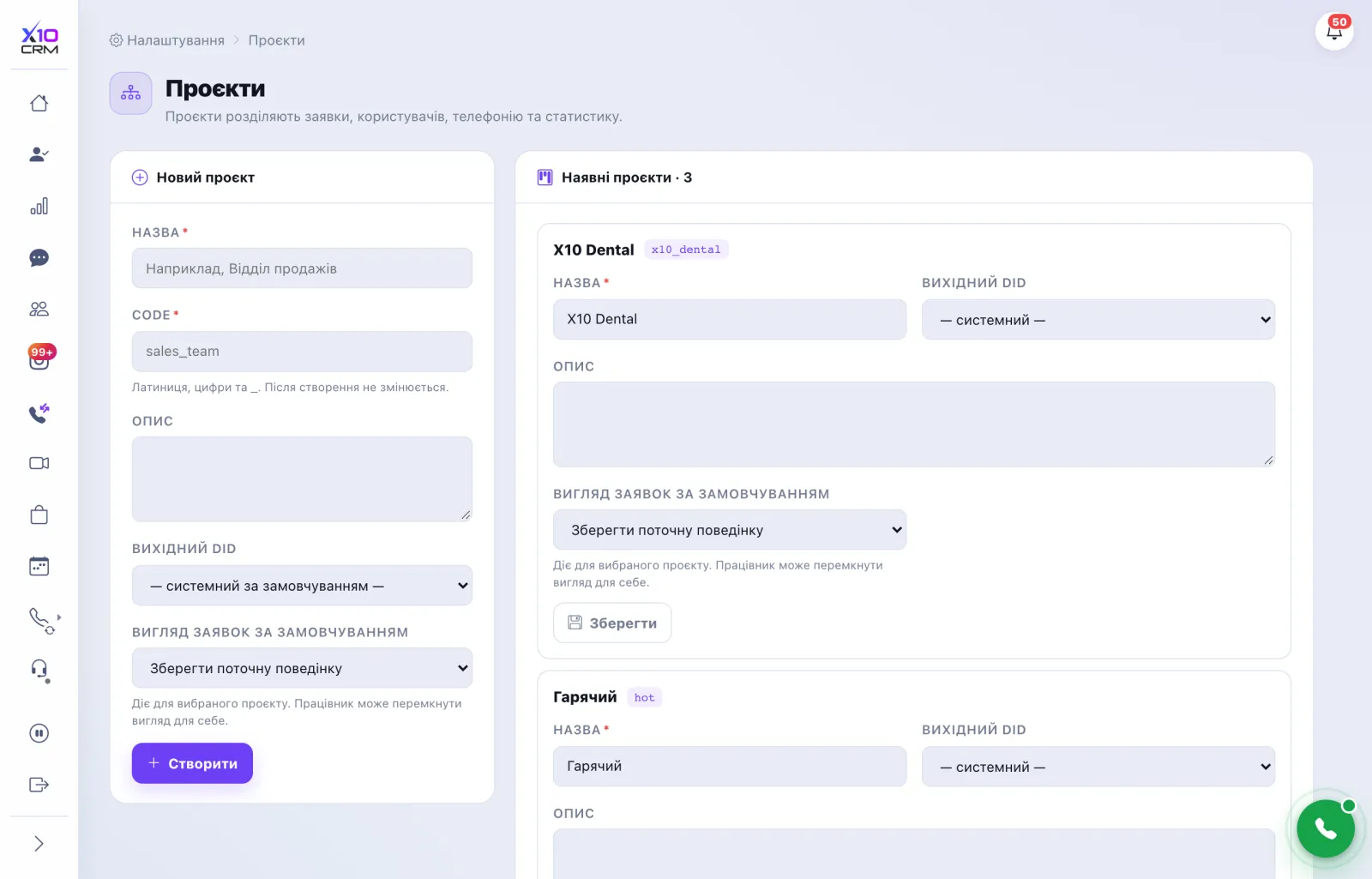
| Field | What to set |
|---|---|
| Name (required) | How the project appears in menus, filters and reports. You can change it at any time. |
| Code (required) | A technical identifier: Latin letters, digits and _, e.g. sales_team. It can't be changed after creation — APIs, integrations and links rely on it. |
| Description | A note for administrators: what the project is for and who works in it. |
| Outbound DID | The number this project's employees call from. "System" means the default number set in telephony. |
| Default lead view | Table or Kanban — what employees see when they open the project's lead list. Everyone can switch the view for themselves; Keep current behavior imposes nothing. |
To let an employee see the project's leads, add the project to their user account.
#Operating mode
Settings → Operating mode answers the question "what does this business sell". The mode never deletes anything: it only decides which modules are available and what's shown by default. Switch back and your data is still there.
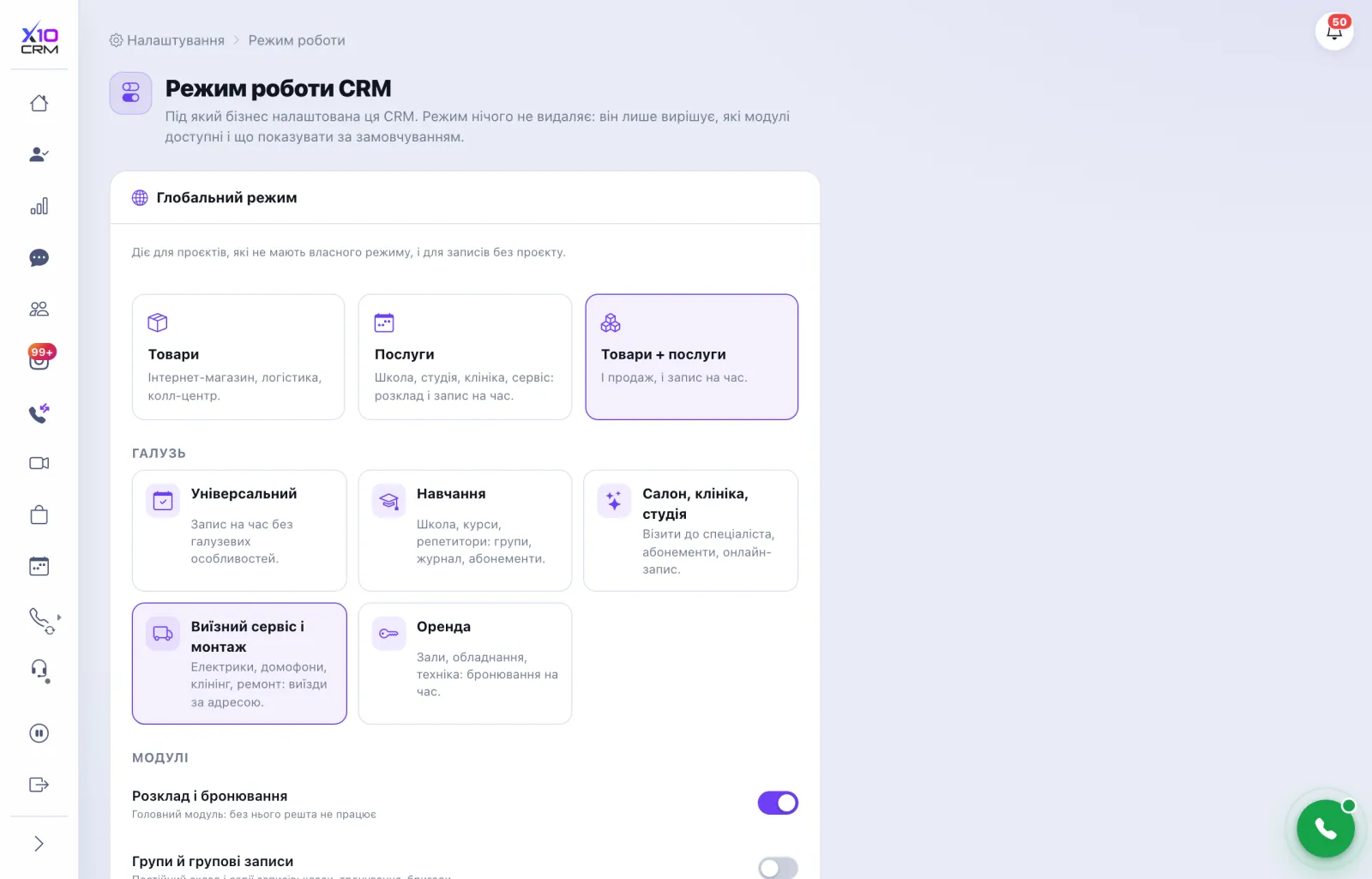
| Mode | For | What appears |
|---|---|---|
| Products | Online stores, product resellers, logistics, call centres | Cart, catalogue, delivery |
| Services | Schools, studios, clinics, service businesses | Schedule, time-slot booking, staff |
| Products + services | Selling and booking at the same time | Everything |
Industry
For services, pick an industry — it chooses the modules and wording that fit your business:
- General — time-slot booking without industry specifics.
- Education — schools, courses, tutors: groups, attendance register, memberships.
- Salon, clinic, studio — visits to a specialist, memberships, online booking.
- Field service & installation — electricians, cleaning, repairs: jobs at the customer's address.
- Rental — halls, equipment, machinery: booking by the hour.
Modules
| Module | What it gives you |
|---|---|
| Schedule and booking | The core module: the other service modules don't work without it |
| Groups & group bookings | A fixed roster and recurring bookings: classes, training sessions, crews |
| Memberships & packages | N visits paid upfront, debts and cash desk |
| Attendance | Who came and who didn't — a register that deducts visits from memberships |
| Online booking | Customers pick a time slot on your website themselves |
| On-site jobs | Address lookup, arrival window, travel time between sites |
| Work execution | "My day" for technicians on their phone: stages, checklist, before and after photos |
How to work with the schedule, groups and memberships is covered in Schedule and services.
Interface names
If you have students rather than clients, or teachers rather than staff — rename them. An empty field means the default name for your industry. Changing the industry updates the hints but never erases names you typed yourself.
Status after bookings and schedule defaults
| Field | What to set |
|---|---|
| When all of a lead's bookings are done | Which status to move the lead to once all its bookings are in the past. "Don't change status" leaves it as is. |
| Time grid interval | From 5 to 60 minutes — the step for picking a booking time. |
| Booking horizon, days | How many days ahead bookings are open. |
| Start and end of day | The working-day boundaries in the calendar. |
| Customer reminders | How many hours before the start to send an SMS. Several values separated by commas: 24,2 means a day before and two hours before. Empty — no reminders. |
| Cancellation deadline, hours | Until when customers can cancel a booking themselves. 0 — no limit. |
#Global mode and project mode
The top of the page holds the global mode: it applies to every project without its own mode and to records with no project. Below is the list of projects, each marked "global" or showing its own mode.
- Open a project to give it its own mode — say, a school runs one project for services and a textbook shop next to it for products.
- A project with its own mode ignores changes to the global one.
- Reset to global deletes the project's own settings, and it inherits every future change to the global mode again.